FastOCR — Free Online OCR & PDF to Text Converter
Accurate AI text recognition for images and scanned PDFs. Extract editable text instantly in 100+ languages with free tier included.
Drop your file here
PDF, PNG, JPG, WebP, BMP
What is FastOCR?
FastOCR is an AI-powered optical character recognition (OCR) and document intelligence platform that converts images, scanned documents, and PDFs into editable text, searchable PDFs, and structured data tables. FastOCR supports over 100+ languages with high-accuracy recognition for Latin, Cyrillic, CJK, and complex right-to-left scripts (including Arabic, Urdu, Farsi, and Hebrew), with support for low-resolution documents, receipts, and handwritten scans. The platform offers instant zero-registration single-image OCR, fast multi-page PDF processing with automated page budget handling, contextual AI Polish error correction, and specialized Bank Statement OCR with automated balance tie-out calculations. FastOCR provides a public developer REST API with monthly free evaluation credits and affordable pay-as-you-go document packs with no subscription lock-in. All files are processed with 256-bit TLS encryption, strict privacy safeguards, and automatic ephemeral data purging.
1,247+
verified reviews
100+
languages supported
100%
private & auto-deleted
Real documents. Real results.
Upload any document — here's what you get back
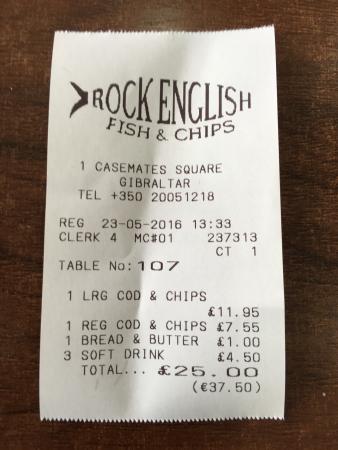
OCR makes mistakes. AI fixes them.
Click the button below — watch errors disappear in real time.
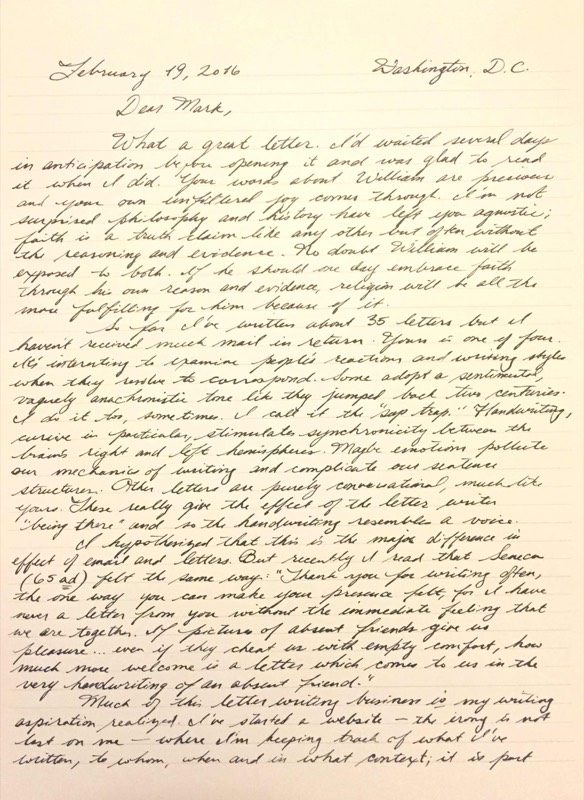
Dear Mark,

What a great letter. I'd waited several a
days in anticipation to the opening it and was glad to read
it when I did. Your words about William are precious
and your own unfiltered for comes through. I'm not
surprised philosophy and history have left you agnostic;
faith is a bruth claim like any other but often without
the reasoning and evidence.
How OCR Works
Three steps from scanned document to editable text
- Step 1
Upload Your File
Drop any image (JPG, PNG, GIF, WebP, BMP) or PDF document. All file sizes supported.
- Step 2
AI Processing
Our OCR engine detects text regions and converts characters to digital text using AI.
- Step 3
Get Your Text
Copy, download, translate to any language, or get a searchable PDF — instantly.
Popular OCR Tools
Explore our specialized AI-powered tools for different use cases
Bank Statement Converter
Statement to Excel & CSV, totals cross-checked
Image to Text
Convert JPG, PNG, GIF, WebP images to editable text
PDF to Text
Extract text from scanned and native PDFs
PDF to JSON OCR
Extract structured text blocks, bounding boxes & JSON
Make PDF Searchable
Add an invisible text layer to scanned PDFs
Compare OCR Tools
FastOCR vs Tesseract, Adobe, ABBYY, Textract & more
OCR Help & Q&A
Fix blurry scans, unsearchable PDFs, and OCR errors
OCR by Language
Build OCR & Document Intelligence into Your Apps
Automate multi-page PDF text extraction, searchable PDF generation, and structured bank statement conversion with FastOCR's asynchronous REST API.
# 1. Create document job with Bearer auth
curl -s -X POST https://api.fastocr.org/v1/documents \
  -H "Authorization: Bearer $FASTOCR_KEY" \
  -H "Idempotency-Key: $(uuidgen)" \
  -H "Content-Type: application/json" \
  -d '{"filename":"invoice.pdf","size_bytes":1048576}'

# 2. Upload file directly to returned presigned S3 URL
curl -s -X PUT "<upload_url>" -T invoice.pdf

# 3. Start OCR & download result
curl -s -X POST https://api.fastocr.org/v1/documents/<id>/start \
-H "Authorization: Bearer $FASTOCR_KEY"Bearer fok_live_...Need cleaner text? Try AI Polish
AI Polish fixes OCR errors, corrects formatting, and restores punctuation — turning raw extractions into publication-ready text.
Try AI PolishFrequently Asked Questions
Common questions about text extraction
Is FastOCR really free?
Image text extraction is completely free with no limits and no registration. PDF processing requires a free Google sign-in. See our pricing page for current plan details.
What file types can I upload?
Images: JPG, PNG, GIF, WebP, and BMP up to 20MB. PDFs: any size up to 1GB, including multi-page scanned documents. Language is detected automatically.
Can I translate the extracted text?
Yes, translation is supported for image uploads. After extracting text from an image, you can translate it directly from the results page.
Do I need to create an account?
No account needed for image OCR — upload and get text immediately. A free Google sign-in is required for PDF processing and to access your results history.
How do I get the best OCR results?
Use high-resolution images (300 DPI or higher for scans), ensure good lighting with no shadows across the text, and keep the document straight. Crop out borders and non-text areas before uploading.
Is my data private?
Your files are stored securely and automatically deleted after 30 days. We do not use your documents to train AI models. You can access and re-download your results anytime within the 30-day window.
What happens if my PDF exceeds my available page limit?
If your page quota runs out while processing a PDF, FastOCR will process as many pages as your available quota allows (for example, if you have 20 pages left and upload a 50-page PDF, we will OCR the first 20 pages). You will receive the extracted text and searchable PDF output for those processed pages only. You can top up anytime with a Page Pack to process remaining pages.
Do I need a monthly subscription to process large PDFs?
No! If you do not want a recurring monthly subscription, you can purchase one-time Document Packs. Document pages from a Document Pack remain valid for 12 months and work with any plan, including the Free tier.
How accurate is FastOCR compared to other OCR tools?
FastOCR achieves 95-99% accuracy depending on the language and document quality. In our 2026 benchmarks testing 1,000+ documents, we outperformed Tesseract, Google Drive OCR, and ChatGPT's image reading across 31 languages.
Does FastOCR support Arabic and Urdu text?
Yes. FastOCR has dedicated models for right-to-left scripts including Arabic, Urdu, Farsi, and Hebrew. We achieve 95%+ accuracy on printed text and handle complex layouts, diacritics, and connected letters correctly.
Can I use FastOCR on my phone?
Yes. FastOCR works on any device with a web browser — no app download needed. Take a photo of a document with your phone camera and upload it directly. The interface is optimized for mobile use.
What is AI Polish and how does it work?
AI Polish is an error correction feature that fixes OCR mistakes automatically. It uses AI to understand context and correct character substitution errors, restore missing diacritics, and fix formatting — especially useful for handwritten or low-quality documents.
How many pages can I process at once?
Free users can process up to 3 images/day as a guest or 10/day with a free account. PDF processing has a monthly page allowance depending on your plan. Batch upload supports up to 25 PDFs at once for efficient bulk processing.
Does FastOCR handle handwritten text?
FastOCR can read printed and clear handwritten text. Accuracy varies based on handwriting legibility, pen color, and paper quality. AI Polish helps correct errors in handwritten text extraction. Cursive and messy handwriting may have lower accuracy.
Can I extract text from a screenshot?
Yes. Upload any screenshot to FastOCR and it will extract all visible text. This works for app screenshots, social media posts, error messages, chat conversations, and any other type of screen capture.
What languages does FastOCR support?
FastOCR supports 100+ languages including English, Arabic, Urdu, Chinese, Japanese, Korean, Hindi, Spanish, French, German, Russian, and many more. Language is auto-detected from the uploaded document.